Social media scheduling tools let a law firm plan, write, and publish posts across several platforms from one dashboard. For a small firm, the best choice is usually the simplest tool that covers your platforms, supports a quick approval step, and costs less than one billable hour a month. Buffer, Metricool, and Planable fit most small teams. Hootsuite suits firms that need deeper analytics. Here is how to choose one and how to use it well.
Why do small law firms need social media management tools?
Most small firms have no marketing department. An attorney or a part-time coordinator posts when there is a free minute. The result is three weeks of silence followed by three posts in one day.
Social media management tools fix this by batching the work. You sit down once, write a month of content, and the tool publishes it for you. Your feed stays active even when you are in depositions.
At Page One Lawyers, we see the same pattern with small firms. Posting stalls during busy case months, and a scheduler is the cheapest fix.
Which social media scheduling tools are best for law firms?
The best social media scheduler depends on who posts, who approves, and what you need to report. Here is how six popular options compare.
| Tool | Best for | Starting price (vendor-listed) | Standout feature |
|---|---|---|---|
| Buffer | Solo attorneys and tiny firms | About $6 per month per channel | Simple queue across 12+ platforms, built-in AI assistant |
| Metricool | Firms that report to partners | About $25 per month | Detailed analytics and competitor tracking |
| Zoho Social | Firms that want automation | Varies by plan | SmartQ timing, RSS automation, evergreen recycling |
| Planable | Firms with approval layers | Varies by plan | Visual mockups and multi-level approvals |
| Hootsuite | Mid-sized firms and agencies | About $99 per user per month | Deep analytics, team tools, bulk scheduling |
| PostEverywhere | Firms using AI assistants | About $9 per month | Official API connections, works with ChatGPT and Claude |
Bottom line: Start with Buffer if one person posts. Choose Planable if a partner must sign off first. Pick Hootsuite only if you truly need its reporting depth. Prices change often, so confirm current rates on each vendor’s site before you buy.
Which scheduler should your firm start with?
Answer five questions. Nothing is saved or sent anywhere.
Answer all five questions to see a starting point.
What features matter most in a social media scheduler?
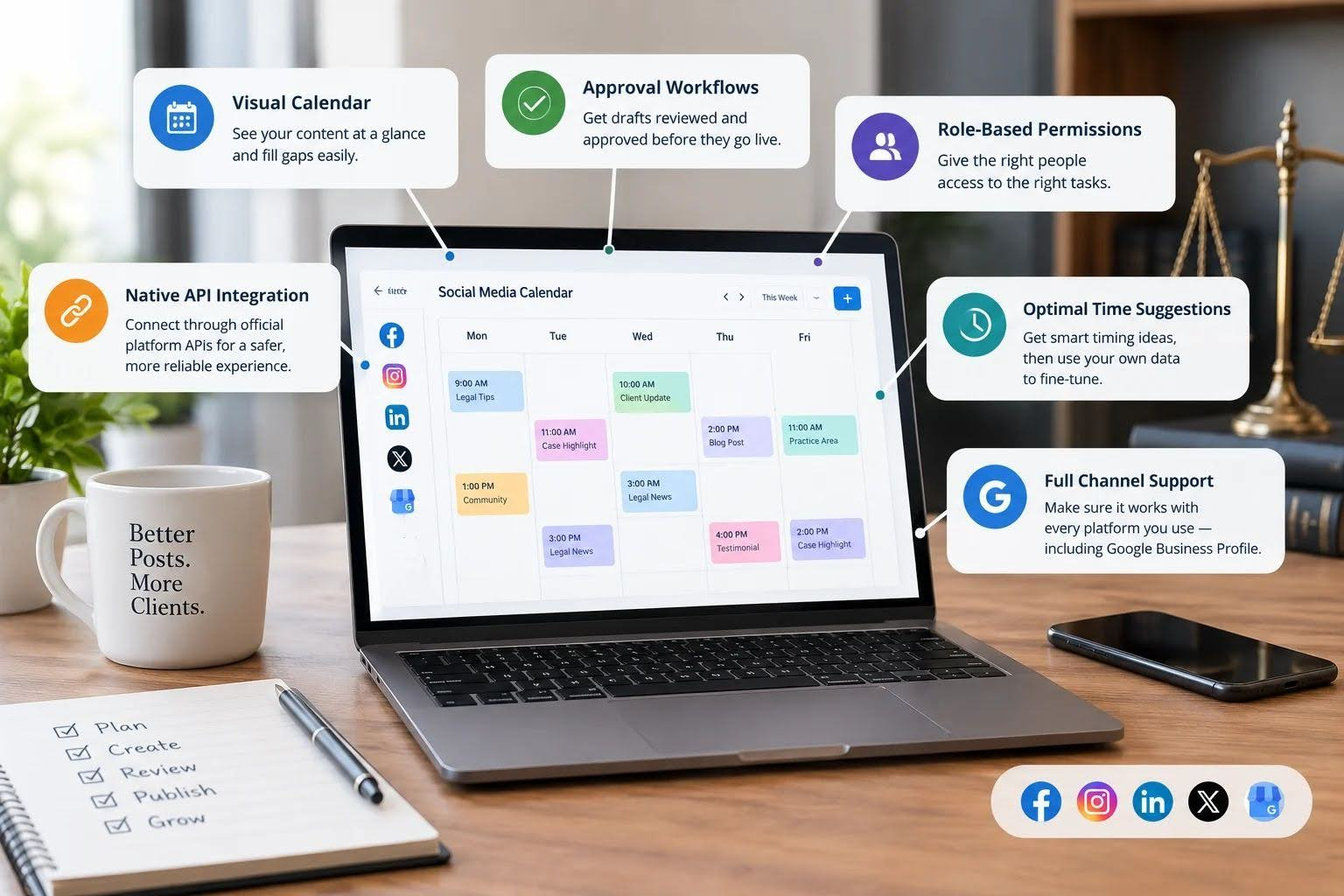
Skip the feature list that reads like a software brochure. Law firms need a short list of things that actually matter.
- Visual calendar: Drag-and-drop weekly or monthly views show gaps at a glance.
- Approval workflows: Shared drafts and client or partner approval links keep unreviewed posts from going live.
- Role-based permissions: A paralegal can draft while only an attorney can publish.
- Native API integration: Tools that connect through official platform APIs are less likely to break or trigger account warnings.
- Optimal time suggestions: Useful, but treat them as a starting guess. Your own analytics will tell you more about your audience.
One gap most roundups ignore: check whether the tool supports every channel you use, including Google Business Profile. Support varies by tool.
How to schedule social media posts, step by step
Learning how to schedule social media posts takes about an hour. Doing it well takes a system.
- Pick two or three platforms. Choose where clients and referral sources actually spend time. LinkedIn and Facebook are common starting points.
- Connect your accounts. Use the tool’s official integration, not a workaround.
- Batch-write a month of posts. One focused session beats daily scrambling.
- Review for accuracy and compliance. Add images and links, then get approval.
- Set your times and publish. Check analytics monthly and adjust.
Some firms try this routine and still struggle to keep it going. Writing, designing, approving, and checking bar rules every month is real work. A social media agency for law firms can take over the calendar, the content, and the compliance review while your team keeps handling cases.
How to build a social media posting schedule that lasts
A realistic social media posting schedule beats an ambitious one you abandon in March. Three posts a week per platform is plenty for most small firms.
Try a simple rotation. Post one educational piece, one firm or community update, and one answer to a common client question. These media scheduling strategies keep your content varied without extra planning.
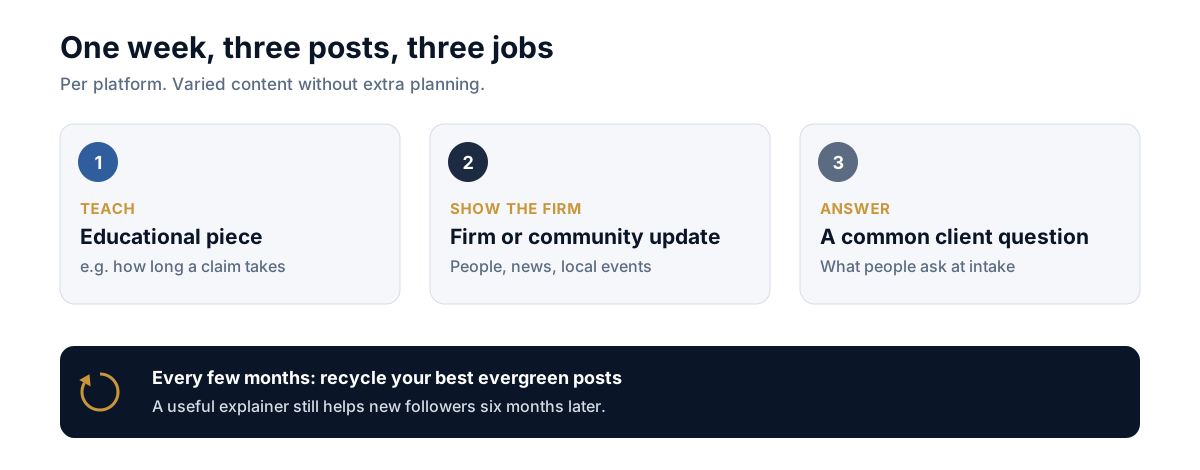
Recycle your best evergreen posts every few months. Tools like Zoho Social automate this. A post that explained how long a claim takes still helps new followers six months later.
What mistakes should law firms avoid when using social media scheduling tools?
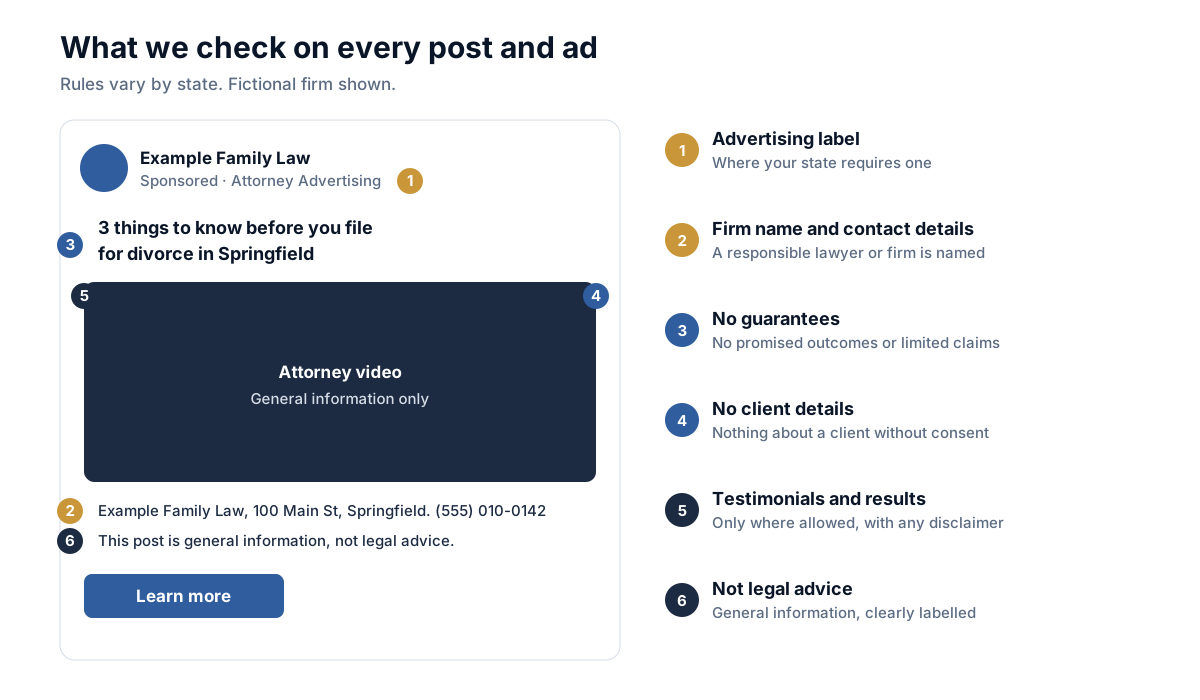
Did you know? ABA Model Rule 7.1 bars false or misleading communications about a lawyer’s services, and each state bar adds its own advertising rules. Some states require specific disclaimers. Scheduled posts are still advertising.
Watch for these common errors:
- Set and forget: A queued post about a local event can look tone-deaf if news breaks that morning.
- Ignoring replies: A scheduler publishes. It does not answer comments or messages for you.
- Sharing client details: Never post anything that could identify a client or reveal confidential information.
Pro tip: Pause your queue after any major local tragedy or news event, then review what is scheduled before restarting it.
Conclusion
Social media scheduling tools turn sporadic posting into a steady habit without adding hours to your week. Choose a tool that matches your team size, build a simple posting rhythm, and review every post against your bar’s advertising rules.
Start small: pick one tool and schedule two weeks of posts this week. See what your audience responds to, then adjust. Talk to Page One Lawyers about building a social media plan that brings in the right clients.
Frequently Asked Questions
Q: What are the best social media scheduling tools for a small law firm?
A: Buffer, Metricool, and Planable are the strongest fits for most small firms. Buffer is the easiest and cheapest, Metricool adds reporting, and Planable handles approvals. Hootsuite works for larger teams that can justify the higher price.
Q: Are social media scheduling tools worth it for lawyers?
A: Yes, if your firm posts at least weekly. A scheduler saves hours by batching work and keeps posting steady during busy periods. The cost is usually small compared with the time it returns.
Q: How do I schedule social media posts for my law firm?
A: Connect your accounts to a scheduling tool, write your posts in one session, and assign each a date and time. Get approval before anything goes live. Review your analytics monthly and adjust.
Q: How often should a law firm post on social media?
A: Two to four posts a week per platform is a workable range for most small firms. Consistency matters more than volume. Pick a pace your team can keep for a year.
Q: What is the difference between a scheduler and social media management tools?
A: A scheduler publishes posts at set times, while full social media management tools add analytics, inbox handling, and team workflows. Many products do both. Small firms often need only the scheduling core.
Q: Can AI write and schedule posts for my firm?
A: Many tools include AI assistants that draft posts, but an attorney should always review the result. AI can get facts wrong or imply guarantees that advertising rules prohibit.