Anyone you invite can manage your Google Business Profile, but only a short list of people should. For a law firm, that means the managing partner, one trusted staff member, and possibly a vetted legal marketing agency, each added through Google’s user roles instead of a shared password. At PageOne Lawyers, we think of the profile as the keys to your digital front office. Who holds which key matters more than how many keys exist.
Who Can Manage Google Business Profile for a Law Firm? The Three Roles
Google gives every profile three access levels:
- Primary owner: One per profile, and the account the listing belongs to. Use a firm-controlled email, never an associate’s personal Gmail.
- Owner: Full control, including adding and removing users.
- Manager: Can edit details, post updates, and answer reviews, but can’t delete the profile or control who else has access.
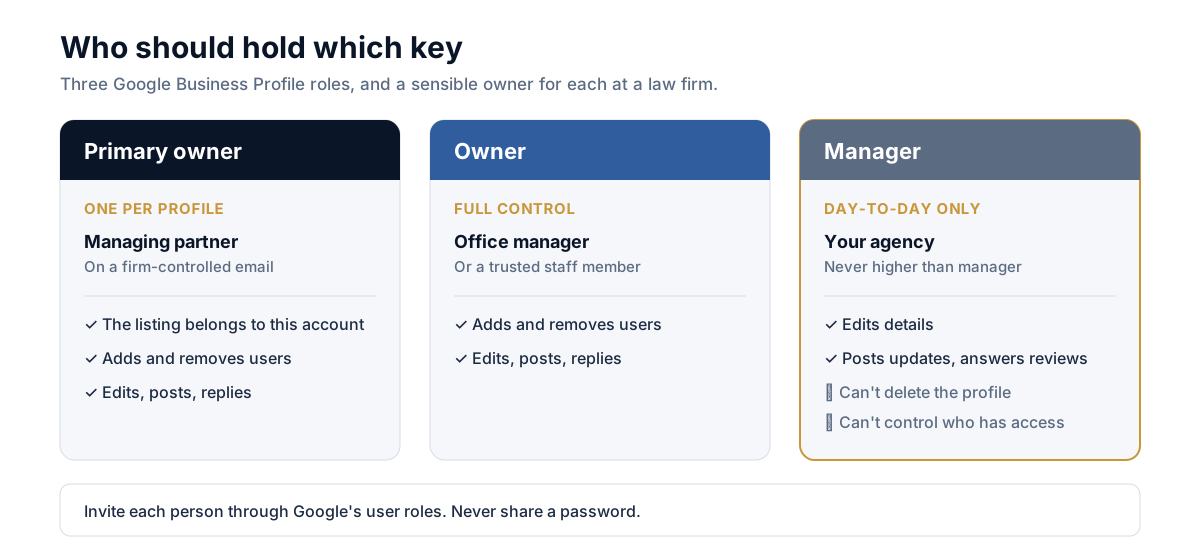
A workable setup is the managing partner as primary owner, the office manager as owner or manager, and any agency as manager only.
Picture an associate who created the listing on a personal account and then left the firm. Now nobody can update holiday hours or reply to a one-star review. Assigning roles early prevents that.
Does a Law Firm Need a Google Business Profile?
Practically, yes. Someone searching “divorce lawyer near me” on a phone sees a map with three firms before they see a single website. A firm with no profile isn’t eligible for that map. The profile is also free, so skipping it is hard to defend.
How Can a Google Business Profile Help My Law Firm?
It puts the actions prospective clients take first (calling, getting directions, opening your site) one tap away. For a DUI or criminal defense firm, a tap-to-call button with accurate after-hours availability can decide whether you get the call or the next listing does. Profile Insights shows how many calls and direction requests you received, so you can measure the effect instead of guessing.
How Law Firms Can Optimize Google Business Profile
Start with accuracy, then add depth:
- Name: Use your real-world business name only. Stuffing in keywords (“Best Injury Lawyer Miami”) breaks Google’s guidelines and risks suspension.
- Categories: Choose the most specific primary category, such as “Personal injury attorney,” plus relevant secondary ones.
- NAP: Your name, address, and phone number should match your website exactly.
- Services and description: List practice areas in plain language a stressed client understands.
- Photos and posts: Use real office and team photos, and post short updates on a steady schedule.
- Website link: Point to the right location or practice page, not always the homepage.
Check your firm's Google Business Profile
Tick everything that's already true. Nothing is saved or sent anywhere.
Tick what's in place to see what to fix.
How to Get a Law Firm Into Google Local 3-Pack
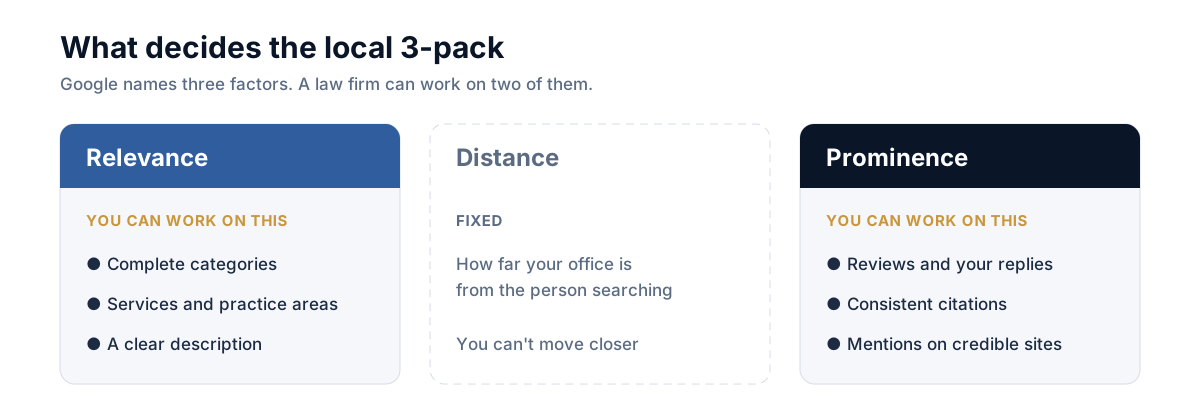
Google says local results rest on three things: relevance, distance, and prominence. You can’t move your office closer to the searcher, so work the other two. Relevance comes from complete categories and services. Prominence comes from reviews, citations, and mentions on credible sites.
If you want the terminology first, the PageOne Lawyers Local Pack glossary entry explains it in plain English. For a full program built around this, see our local SEO for law firms service.
How Google Reviews Affect Law Firm Search Ranking
Reviews feed prominence, and Google has said review count and score influence local ranking. Recency, detail, and your replies matter too.
Follow two rules. Never offer incentives for reviews or screen out unhappy clients first, because both break Google’s policies. And never confirm in a public reply that someone was your client, because that protects confidentiality. A calm, generic response (“We take feedback seriously, please call our office”) is safer than a point-by-point rebuttal.
How to Write a Google Review for a Lawyer
Search the firm’s name on Google, tap Write a review, choose your stars, then describe the experience: how quickly they responded, how clearly they explained things, and any outcome you’re comfortable sharing. Skip case details you wouldn’t want public.
How to Leave a Google Review for an Attorney
Sign in to your Google account, open the attorney’s profile in Search or Maps, select Write a review, rate, and post. Firms can make this a one-tap step by sending clients the profile’s direct review link.
How to Build Local Citations for Law Firm SEO
A citation is any online mention of your firm’s name, address, and phone number. Build them in this order:
- Your Google profile
- Bing and Apple listings
- Legal directories like Avvo, Justia, and FindLaw
- Your state bar profile
- General directories such as Yelp and the BBB
Every entry must match your website character for character. Fix duplicates before adding new listings. For links beyond citations, PageOne Lawyers also offers legal link building from publications attorneys actually read.
How to Improve Google Business Profile Performance for Marketing Firms
If you’re a marketing firm managing law-firm profiles, request manager access through Google’s invite flow and never ask for a password. Leave the firm as primary owner so the listing stays theirs if you part ways. Report monthly on calls, direction requests, and review growth, since those are the numbers partners care about. Our analytics and reporting page shows how PageOne Lawyers ties that data to consultations. For more quick wins, browse our 25 law firm SEO tips.
FAQ
Q1. Who can manage Google Business Profile for a law firm?
The primary owner, plus any owners or managers they invite. Typically that’s the managing partner, a trusted staff member, and a vetted agency as manager.
Q2. Does a law firm need a Google Business Profile?
If you want to appear in map results for “lawyer near me” searches, yes. Without one, your firm isn’t eligible for the local map listings.
Q3. How can a Google Business Profile help my law firm?
It surfaces calls, directions, hours, reviews, and your website at the moment someone searches, and Insights lets you track those actions.
Q4. How can law firms optimize Google Business Profile?
Use your real name, the most specific categories, matching NAP details, clear services, real photos, and regular posts.
Q5. How do I get a law firm into the Google local 3-pack?
Strengthen relevance and prominence through complete listings, steady reviews, consistent citations, and quality links. Distance is the one factor you can’t change.